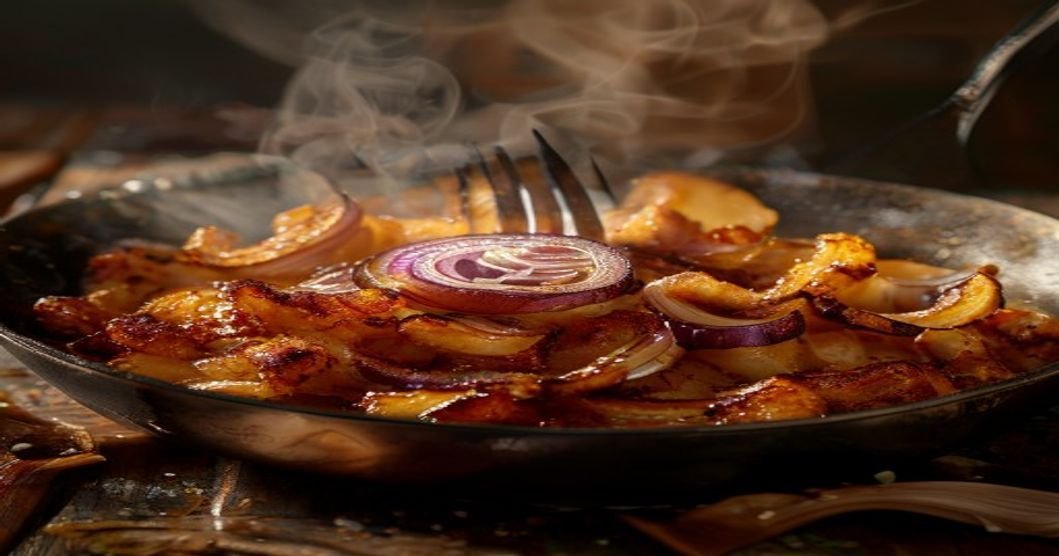
Start your day with a hearty and flavorful breakfast by making this Crispy Hashbrown Skillet with Caramelized Onions. This dish combines the satisfying crunch of perfectly cooked hashbrowns with the deep, sweet flavor of caramelized onions, creating a dish that’s both comforting and elegant. Whether you’re serving it for a lazy weekend brunch, a quick weekday breakfast, or even a light dinner, this skillet recipe is sure to impress.
One of the best things about this recipe is its versatility. You can customize it with your favorite add-ins like bell peppers, mushrooms, cheese, or even a fried egg on top. Plus, it reheats beautifully, making it a great option for meal prep. In this guide, we’ll walk you through every step of making this dish, from selecting the right ingredients to mastering the technique for perfectly crispy hashbrowns and deeply caramelized onions.
Why This Hashbrown Skillet Recipe Works
This recipe stands out for several reasons:
- Perfect Texture: The hashbrowns are cooked until golden and crispy on the outside while remaining tender on the inside. The onions add a soft, melt-in-your-mouth contrast.
- Pro Tip: For extra crispiness, press the hashbrowns gently with a spatula during the last few minutes of cooking to ensure even browning.
- Balanced Flavors: The sweetness of the caramelized onions pairs beautifully with the savory, slightly salty hashbrowns. A touch of fresh herbs or a sprinkle of cheese can elevate the dish even further.
- Flavor Variations: Try adding smoked paprika for a hint of smokiness, or a dash of hot sauce for a spicy kick.
- Make-Ahead Friendly: This dish can be prepped ahead of time and reheated in the oven or skillet for a quick meal. The hashbrowns and onions can even be cooked separately and combined when ready to serve.
- Storage Tips: Store leftovers in an airtight container in the fridge for up to 3 days. Reheat in a skillet over medium heat or in the oven at 350°F (175°C) until warmed through.
- Budget-Friendly: Potatoes and onions are affordable staples, making this a cost-effective meal that doesn’t skimp on flavor.
- Ingredient Swaps: Use frozen shredded hashbrowns if fresh aren’t available, or swap onions for leeks or shallots for a milder flavor.
Ingredients You’ll Need
Gather these simple ingredients to make your hashbrown skillet:
- For the Hashbrowns:
- 4 cups (about 1.5 lbs) frozen shredded hashbrowns (or fresh, if preferred)
- 2 tablespoons olive oil or butter (divided)
- 1 teaspoon salt (adjust to taste)
- ½ teaspoon black pepper
- ½ teaspoon garlic powder
- ½ teaspoon onion powder
- For the Caramelized Onions:
- 2 large yellow onions, thinly sliced
- 2 tablespoons butter or olive oil
- 1 teaspoon salt (for onions)
- 1 tablespoon brown sugar (optional, for extra caramelization)
- 1 teaspoon balsamic vinegar (optional, for depth of flavor)
- Optional Add-Ins:
- 1 bell pepper, diced
- 1 cup mushrooms, sliced
- ½ cup shredded cheese (cheddar, pepper jack, or feta work well)
- 2 cloves garlic, minced
- Fresh herbs like chives, parsley, or cilantro for garnish
- Fried or poached eggs for serving
Step-by-Step Instructions
1. Prepare the Caramelized Onions
Caramelizing onions is a slow process but worth the effort for their rich, sweet flavor. Follow these steps:
- Slice the onions: Thinly slice the onions (about ¼-inch thick). The thinner the slices, the faster they’ll caramelize.
- Pro Tip: Use a mandoline slicer for even slices if you have one.
- Cook the onions: Heat 2 tablespoons of butter or olive oil in a large oven-safe skillet (12-inch or larger) over medium-low heat. Add the sliced onions and 1 teaspoon of salt. Stir to coat the onions in the fat.
- Why medium-low? High heat can burn the onions before they caramelize. Patience is key here!
- Caramelize slowly: Cook the onions for about 20-25 minutes, stirring occasionally, until they turn a deep golden brown. If they start to stick to the pan, add a splash of water or broth to deglaze.
- Add depth: For extra flavor, stir in 1 tablespoon of brown sugar and 1 teaspoon of balsamic vinegar during the last 5 minutes of cooking.
- Set aside: Once caramelized, transfer the onions to a plate and set aside. Keep the skillet handy for cooking the hashbrowns.
- Make-Ahead: Caramelized onions can be stored in the fridge for up to 5 days or frozen for up to 3 months.
2. Cook the Hashbrowns
For crispy, golden hashbrowns, follow these steps:
- Thaw the hashbrowns (if frozen): Spread the frozen hashbrowns on a paper towel-lined plate and let them thaw for 5-10 minutes. This helps remove excess moisture, which is key for crispiness.
- Fresh hashbrowns: If using fresh potatoes, grate them and squeeze out as much moisture as possible using a clean towel.
- Heat the skillet: Place the same skillet you used for the onions over medium-high heat. Add 1 tablespoon of oil or butter and swirl to coat the pan.
- Pro Tip: Use a well-seasoned cast-iron skillet for the best results. Cast iron retains heat well and helps achieve even browning.
- Cook the hashbrowns: Add the hashbrowns to the skillet in an even layer. Sprinkle with salt, pepper, garlic powder, and onion powder. Press down gently with a spatula to compact the hashbrowns.
- Don’t overcrowd: If your skillet isn’t large enough, cook the hashbrowns in batches to avoid steaming them.
- Crisp to perfection: Cook undisturbed for 5-7 minutes, or until the bottom is golden brown and crispy. Flip the hashbrowns in sections (like a pie) or use a large spatula to flip them all at once. Cook for another 5-7 minutes until the other side is crispy.
- Optional finish: Sprinkle shredded cheese over the hashbrowns during the last 2 minutes of cooking if desired.
3. Combine and Serve
Now it’s time to bring the dish together:
- Combine the ingredients: Spread the caramelized onions evenly over the cooked hashbrowns. If using any add-ins like bell peppers or mushrooms, sauté them in the skillet first and then add them to the hashbrowns.
- Layering tip: For a rustic look, mix the onions into the hashbrowns instead of layering them on top.
- Garnish and serve: Sprinkle with fresh herbs like chives or parsley. For a protein boost, top with a fried or poached egg. Serve hot directly from the skillet.
- Presentation: Garnish with a dollop of sour cream, a drizzle of hot sauce, or a sprinkle of everything bagel seasoning for extra flair.
Tips for Success
Follow these tips to ensure your hashbrown skillet turns out perfectly every time:
- Choose the right potatoes: Russet potatoes are ideal for hashbrowns due to their high starch content, which helps them crisp up nicely. Avoid waxy potatoes like red or new potatoes, as they won’t get as crispy.
- Alternative: If you can’t find russets, Yukon Gold potatoes are a good substitute.
- Remove excess moisture: Whether using fresh or frozen hashbrowns, squeezing out moisture is crucial for crispiness. Don’t skip this step!
- Test for dryness: After squeezing, the hashbrowns should feel dry to the touch. If they’re still damp, pat them with another paper towel.
- Don’t rush the caramelization: Caramelizing onions takes time—about 20-30 minutes on medium-low heat. Rushing this process will result in onions that are burnt on the outside and raw on the inside.
- Shortcut: If you’re short on time, use 1 tablespoon of caramelized onion paste (available in some grocery stores) mixed with a little water to thin it out.
- Keep the heat consistent: Medium-high heat is ideal for crispy hashbrowns. Too low, and they’ll steam; too high, and they’ll burn before cooking through.
- Adjust as needed: If the hashbrowns are browning too quickly, reduce the heat to medium.
- Experiment with seasonings: While the recipe calls for basic seasonings, don’t be afraid to get creative. Try adding smoked paprika, cumin, or even a pinch of cayenne for a flavor boost.
- Herb pairings: Fresh rosemary, thyme, or sage work beautifully with hashbrowns and onions.
Variations and Serving Suggestions
This hashbrown skillet is incredibly versatile. Here are some delicious ways to customize it:
Breakfast Variations
- Cheesy Hashbrown Skillet: Add ½ cup of shredded cheddar or pepper jack cheese to the hashbrowns during the last 2 minutes of cooking. Top with crumbled bacon or sausage for a hearty breakfast.
- Serving suggestion: Serve with a side of avocado slices or a simple green salad.
- Mediterranean Hashbrown Skillet: Swap the onions for 1 cup of diced roasted red peppers and add ½ cup of crumbled feta cheese. Garnish with fresh oregano and a drizzle of tzatziki sauce.
- Serving suggestion: Serve with a poached egg on top for a brunch-worthy dish.
- Southwest Hashbrown Skillet: Add ½ cup of black beans, ½ cup of corn, and ½ cup of diced bell peppers. Season with cumin, chili powder, and a squeeze of lime. Top with avocado and a fried egg.
- Serving suggestion: Serve with a side of salsa and sour cream for dipping.
Dinner Variations
- Vegetarian Hashbrown Skillet: Add sautéed spinach, mushrooms, and cherry tomatoes. Top with a sprinkle of nutritional yeast for a cheesy flavor without the dairy.
- Serving suggestion: Serve with a side of roasted sweet potatoes or a simple arugula salad.
- Breakfast-for-Dinner Hashbrown Skillet: Top the hashbrowns with crispy bacon, a fried egg, and a drizzle of maple syrup. Add a side of buttered toast for a comforting meal.
- Serving suggestion: Garnish with chopped chives and a pinch of flaky sea salt.
- Asian-Inspired Hashbrown Skillet: Add 1 tablespoon of soy sauce, 1 teaspoon of sesame oil, and ½ cup of shredded cabbage to the hashbrowns. Top with a fried egg and sliced green onions.
- Serving suggestion: Serve with a side of kimchi or a simple cucumber salad.
Frequently Asked Questions
Can I make this recipe ahead of time?
Yes! You can prepare the caramelized onions and hashbrowns separately ahead of time. Store them in the fridge for up to 3 days or freeze the onions for up to 3 months. When ready to serve, reheat the hashbrowns in a skillet over medium heat until crispy, then top with the warmed onions.
What’s the best way to reheat leftovers?
Reheat the hashbrown skillet in a skillet over medium heat for 5-7 minutes, stirring occasionally, until warmed through. For best results, avoid using the microwave, as it can make the hashbrowns soggy. Alternatively, reheat in a preheated oven at 350°F (175°C) for 10-15 minutes.
Can I use fresh potatoes instead of frozen hashbrowns?
Absolutely! Use about 4 medium russet potatoes, peeled and grated. After grating, squeeze out as much moisture as possible using a clean towel. Fresh potatoes will give you a slightly different texture but are just as delicious.
How do I store leftovers?
Store leftovers in an airtight container in the fridge for up to 3 days. For longer storage, freeze the hashbrowns and onions separately for up to 3 months. Thaw in the fridge overnight before reheating.
What can I serve with this dish?
This hashbrown skillet is versatile and can be served as a standalone meal or paired with sides. Some great options include:
- A simple green salad with a tangy vinaigrette
- Fresh fruit like sliced apples, berries, or a melon salad
- Avocado slices or guacamole
- A side of roasted vegetables or a simple sautéed green
- Toasted bread or a warm bagel with cream cheese
Final Thoughts
The Crispy Hashbrown Skillet with Caramelized Onions is a dish that’s simple to make but delivers big on flavor and satisfaction. Whether you’re cooking for a crowd, meal prepping for the week, or just treating yourself to a delicious breakfast, this recipe is a winner. The key to success lies in taking your time to caramelize the onions and ensuring the hashbrowns are crispy and golden. With endless variations and serving suggestions, you can make this dish your own and enjoy it time and time again.
So, gather your ingredients, fire up the skillet, and get ready to enjoy a meal that’s as comforting as it is delicious. Don’t forget to share your creations with us on social media—we’d love to see your hashbrown skillet masterpieces!