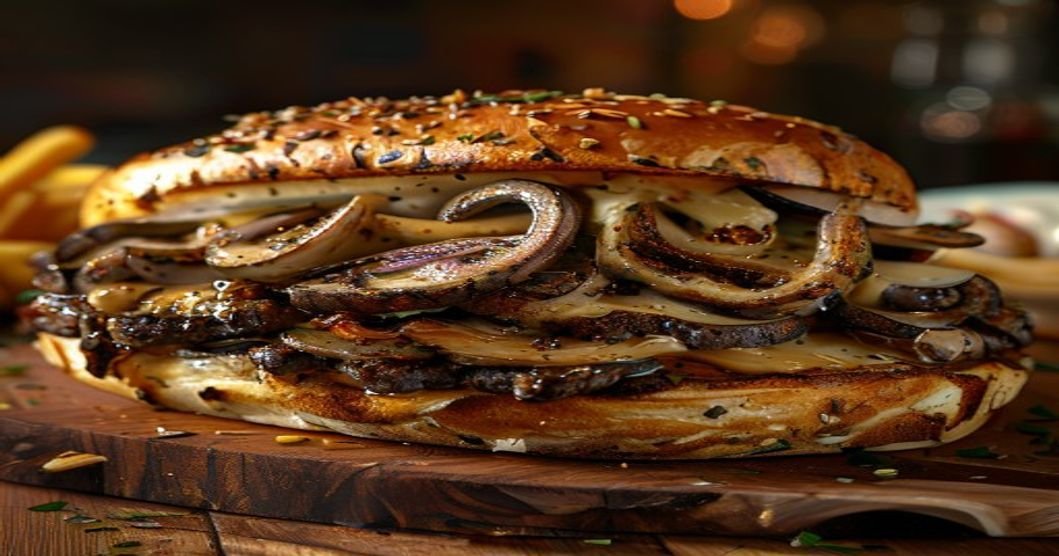
The Ultimate Vegan Philly Cheesesteak (Using Mushrooms)
A step-by-step guide to making the most authentic and flavorful vegan Philly cheesesteak sandwich using mushrooms, caramelized onions, and melted vegan cheese. Perfect for game day, meal prep, or a quick weeknight dinner.
Why This Vegan Philly Cheesesteak Stands Out
Traditional Philly cheesesteaks rely on thinly sliced beef, provolone cheese, and caramelized onions on a crusty roll. This vegan version captures all those flavors and textures using plant-based ingredients that even meat-eaters will love. The key is in the mushroom selection and proper seasoning.
Here’s what makes this recipe special:
- Meaty texture: Portobello mushrooms (or a mix of cremini and shiitake) mimic the chewiness of beef when sliced thinly and cooked properly.
- Umami depth: Soy sauce, nutritional yeast, and a splash of balsamic vinegar add the savory richness missing from most vegan versions.
- Perfect melt: A blend of vegan cheeses (like Miyoko’s or Violife) ensures that gooey, stretchy cheese pull you crave.
- Authentic assembly: Toasted hoagie rolls and caramelized onions complete the experience, just like the original.
Ingredients You’ll Need
Gather these ingredients for the best results. Quality matters, especially for the mushrooms and cheese:
For the Mushroom “Steak”
- 1 lb (450g) portobello mushrooms (or a mix of 1 lb cremini + 8 oz shiitake for extra depth)
- 2 tbsp olive oil (divided)
- 1 large onion, thinly sliced
- 4 cloves garlic, minced
- 2 tbsp soy sauce or tamari (for umami)
- 1 tbsp balsamic vinegar (for caramelization)
- 1 tbsp nutritional yeast (for cheesy flavor)
- 1 tsp smoked paprika (for depth)
- 1/2 tsp black pepper
- 1/2 tsp salt (adjust to taste)
- 1 tsp liquid smoke (optional) (for a smoky char flavor)
For the Cheese Sauce
- 1 cup vegan cheese shreds (Miyoko’s, Violife, or Follow Your Heart work well)
- 1/4 cup unsweetened plant-based milk (oat or cashew milk for creaminess)
- 1 tbsp cornstarch or arrowroot powder (for thickening)
- 1/2 tsp garlic powder
- 1/2 tsp onion powder
- Pinch of turmeric (optional) (for color, not flavor)
For Assembly
- 4 hoagie rolls or sub rolls (toasted until golden)
- Toppings: Sliced banana peppers, fresh parsley, or hot sauce (optional)
Step-by-Step Instructions
1. Prepare the Mushrooms
Clean the mushrooms with a damp paper towel to remove any dirt. Remove the stems and gills (for portobellos) to prevent excess moisture. Slice the mushrooms very thinly (about 1/8-inch thick) against the grain to mimic the texture of beef. Set aside.
2. Caramelize the Onions
In a large skillet or cast-iron pan, heat 1 tbsp olive oil over medium-low heat. Add the sliced onions and cook for 15–20 minutes, stirring occasionally, until deep golden brown and sweet. Add the minced garlic in the last 2 minutes of cooking. Transfer the onions to a plate and set aside.
3. Cook the Mushroom “Steak”
In the same pan (no need to clean it), heat the remaining 1 tbsp olive oil over medium-high heat. Add the sliced mushrooms in a single layer (work in batches if needed). Sprinkle with 1/2 tsp salt and 1/2 tsp black pepper. Let them sear undisturbed for 2–3 minutes to develop a deep brown crust. Stir and repeat until the mushrooms are tender and have released their moisture (about 8–10 minutes total).
Reduce the heat to medium and add the soy sauce, balsamic vinegar, nutritional yeast, smoked paprika, and liquid smoke (if using). Stir well and cook for another 3–4 minutes until the liquid has mostly evaporated and the mushrooms are glazed. Taste and adjust seasoning if needed. Remove from heat and stir in the caramelized onions.
4. Make the Vegan Cheese Sauce
In a small saucepan, combine the vegan cheese shreds, plant-based milk, cornstarch, garlic powder, onion powder, and turmeric. Heat over medium-low, stirring constantly, until the cheese is fully melted and the sauce is smooth and thick enough to coat the back of a spoon (about 5–7 minutes). If the sauce is too thick, add a splash more milk. If too thin, simmer longer to reduce.
5. Toast the Rolls
Slice the hoagie rolls in half lengthwise and toast them in a toaster, oven (400°F/200°C for 5 minutes), or on a skillet until golden brown and slightly crisp.
6. Assemble the Sandwiches
Spread a generous layer of the vegan cheese sauce on both sides of the toasted rolls. Pile the mushroom mixture onto the bottom half, then top with the other half of the roll. Press down gently to help the cheese melt further.
Pro tip: For extra indulgence, broil the assembled sandwiches for 2–3 minutes to melt the cheese further and crisp the rolls. Watch closely to avoid burning.
7. Serve Immediately
Slice the sandwiches in half (if desired) and serve with your favorite sides: crispy fries, a simple salad, or pickled jalapeños for heat. Drizzle with hot sauce or vegan mayo if you like extra moisture.
Pro Tips for the Best Vegan Philly Cheesesteak
Choosing the Right Mushrooms
- Portobello mushrooms: The gold standard for texture and flavor. Their large caps are perfect for slicing thinly.
- Cremini + shiitake mix: Shiitakes add a meaty depth, while creminis provide a neutral base. Use a 2:1 ratio.
- Avoid white button mushrooms: They’re too soft and lack the umami needed for this dish.
Make It Ahead of Time
- Mushrooms: Cook the mushrooms and onions up to 3 days ahead. Store in an airtight container in the fridge. Reheat in a skillet before assembling.
- Cheese sauce: Make the sauce up to 2 days ahead. Reheat gently in a saucepan or microwave, adding a splash of milk to thin if needed.
- Rolls: Toast the rolls just before assembling to keep them crisp.
Variations to Try
- Spicy kick: Add sliced jalapeños or a dash of hot sauce to the mushrooms.
- Cheesy overload: Mix in vegan pepper jack cheese for heat or smoked gouda for extra depth.
- Low-carb option: Serve the mushroom mixture over a bed of lettuce or in a collard green wrap.
- Meal prep: Assemble the sandwiches (without toasting) and freeze for up to 1 month. Reheat in the oven at 350°F (175°C) for 15 minutes.
Common Mistakes to Avoid
- Overcrowding the pan: Cook mushrooms in batches to avoid steaming instead of searing.
- Skipping the caramelization: Undercooked onions will taste sharp and bitter. Take your time!
- Using low-quality vegan cheese: Some brands don’t melt well. Test yours first or stick to brands known for melting (like Miyoko’s).
- Forgetting to season: Mushrooms are bland on their own. Season generously with salt, pepper, and smoked paprika.
Serving Suggestions and Pairings
This vegan Philly cheesesteak is a hearty meal on its own, but pairing it with the right sides can turn it into a full spread. Here are some ideas:
Classic Pairings
- Crispy fries or tater tots: The ultimate comfort food combo. Serve with vegan gravy for dipping.
- Side salad: A simple arugula salad with lemon vinaigrette cuts through the richness.
- Pickles or giardiniera: The tangy crunch balances the savory sandwich.
Game Day or Party Spread
- Loaded vegan nachos: Top tortilla chips with cheese sauce, black beans, salsa, and guacamole.
- Buffalo cauliflower bites: Spicy, crispy, and perfect for sharing.
- Vegan onion rings: A crunchy, savory side that pairs well with the sandwich.
Drink Pairings
- Sparkling water with lemon: The acidity cleanses the palate.
- Iced tea or lemonade: A sweet and refreshing contrast.
- Beer or cider: A crisp lager or amber ale complements the umami flavors.
Frequently Asked Questions
Can I use other mushrooms instead of portobellos?
Yes! While portobellos are ideal for their meaty texture, you can use a mix of cremini and shiitake mushrooms for extra depth. Avoid white button mushrooms, as they’re too soft and lack flavor.
What’s the best vegan cheese to use for melting?
Look for vegan cheeses specifically designed to melt, such as Miyoko’s Creamery, Violife, or Follow Your Heart. Avoid block-style cheeses that don’t melt well, as they can turn grainy when heated.
How do I store leftovers?
Store leftover mushroom mixture and cheese sauce separately in airtight containers in the fridge for up to 3 days. Reheat the mushrooms in a skillet over medium heat, then assemble the sandwich fresh. The rolls are best toasted just before serving.
Can I make this gluten-free?
Yes! Use gluten-free hoagie rolls and tamari instead of soy sauce. Ensure your vegan cheese is also gluten-free, as some brands contain wheat.
Why are my mushrooms releasing so much water?
Mushrooms naturally release moisture when cooked. To minimize this, slice them thinly and cook them in batches over high heat to evaporate the water quickly. Avoid overcrowding the pan.
Can I freeze this sandwich?
It’s best to freeze the mushroom mixture and cheese sauce separately. Assemble the sandwich fresh when ready to eat, as the rolls can become soggy when thawed.